¶ Rates and pricing for Depots on ONEtobeONE
Rates are prices for services. Every service on an order that has a rate set will generate a subline on an Invoice.
You can set rates for nearly everything on a service/cleaning order, as well as define Partner specific rates.
You can find the rates view at System -> Rates.
¶ Using rates
¶ Rate types
Rate per order is the standard price you charge for a service:
- Storage order: The hourly rate for storage
- Heating order: The hourly rate for heating
- Washing order: The price of an external wash
- Cleaning order: The price you charge for a specific Cleaning Method or program
You can set alternate prices for the rate types above with Price Groups, for example rates for types of vehicles or containers.
Rates for running costs and extra services are how you price everything on top of the base cost.
These rates include, but are not limited to:
- Cleaning options selected by your clients
- Fees for payment methods
- Environmental tax added as a flat fee or a percentage of the invoice total
- Etc.
¶ Alternate rates
¶ Pricing for partners
Every rate type allows you to enter a Partner in the "Invoice to:" field.
When a partner is added to a rate, this rate will only apply to the certain partner. This allows you to automatically generate invoices, that honor an agreement or a discount.
You can also set a percentage discount on the invoice total with the rate type Customer Discount.
¶ Price Groups
Price Groups for Service orders
Price groups are required for the Rate types Washing Order, Heating Order and Storage order.
For Service orders the price group is the service you offer
For washign orders the name, and picture, used will appear on the Driver Kiosk a
Price groups are a way to set multiple different prices for a Rate per Order.
Once you have assigned a price group to a station, it will become required for completion to select a price group on the order where the station is selected.
You can view and add Price Groups at System -> Price Groups. To add a new group click New on the blue action bar, once created you can select the Price Group when adding or editing a rate.
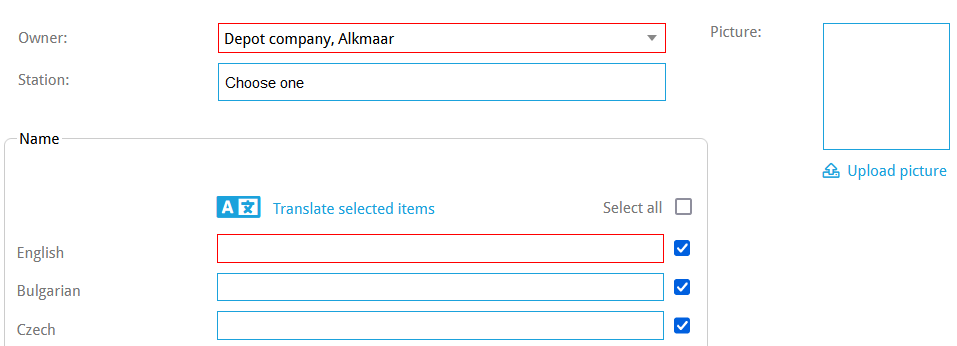
- Owner: The Company you want to create the Price Group for
- Station: The station this Price group is selectable at. You can add multiple
- Name: The name used for this price group
- Enter the name in one language and click Translate
- Translations are important for the selection of the price groups on the driver terminal
- Picture: Used only in the driver terminal for washing orders
¶ Viewing, editing, and adding new rates
You can find rates at System -> Rates
In this view the first column is the Rate type and we have the determinant 1 and determinant 2 columns. A determinant is a variable to specify a certain rate for a specific situation.
¶ Adding or editing rates
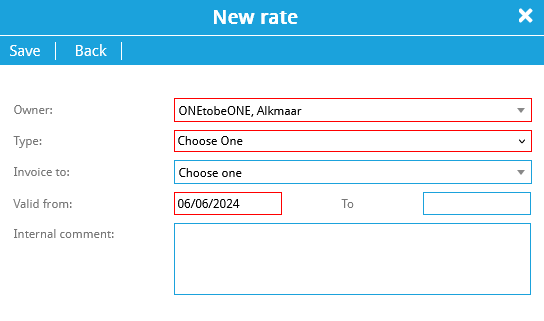
- Click New on the blue action bar in System -> Rates
- Owner: The company this rate is used for.
- Type: What this rate applies for.
- Invoice to: Fill this field if this rate only applies to a specific partner
- Valid from/to: The date range when this rate is applied
- Internal comments: Comment only for internal registration
For some rate types you can select a Price Group. You can create Price Groups at System -> Price Groups
- Click Edit on the left side of the rate you want to edit in System -> Rates
- You can enter search terms on the first line of this list view
- Owner: The company this rate is used for.
- Type: What this rate applies for.
- Invoice to: Fill this field if this rate only applies to a specific partner
- Valid from/to: The date range when this rate is applied
- Internal comments: Comment only for internal registration
For some rate types you can select a Price Group. You can create Price Groups at System -> Price Groups